Back
BackStep 3. PAGES
Seo block
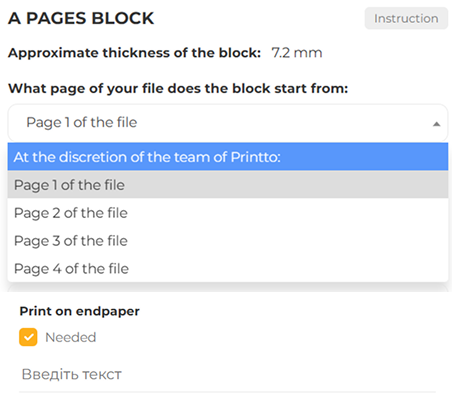
ON WHICH PAGE OF YOUR FILE DOES THE BLOCK BEGIN?
Your PDF file may contain not only the book’s pages but also additional elements, such as the cover, endpapers, blank pages, and service pages. To ensure error-free printing, the printing house needs to know where the main text begins. This affects the correct placement of bleed marks, binding, and other technical aspects of book production.
Page selection options:
- “At the discretion of the Printto team” – the printing house will determine the start of the book block itself.
- “Page 1 of the file” – the book starts from the first page of the PDF. Use this if the file contains only the book’s pages without a cover or other elements.
- “Page 2 / 3 / 4 of the file” – means that the first pages contain additional materials, and the book’s text begins later.
How to choose correctly:
- Page 1 – if the file contains only the book’s pages without a cover or blank pages.
- Another page – if there is a cover or endpapers at the beginning.
- “At the printer’s discretion” – if you’re unsure, this is the best option for safe printing.
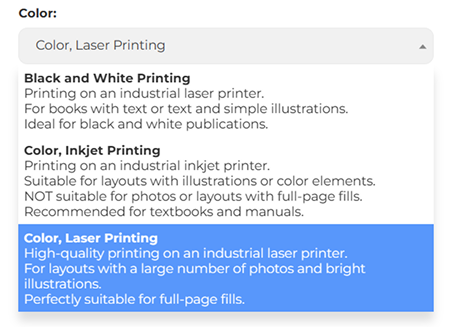
PRINT COLOR
Imagine what the pages of your future book should look like. Black and white, brightly colored, or perhaps with a photo effect? Here are the options I suggest:
- Monochrome black and white — classic black and white printing. Ideal for books where text clarity and color economy are important.
- Color — this option is ideal for highlighting individual elements or for grayscale images. It looks stylish but is less expensive than photo-quality color printing.
- Color, photo-quality printing - is for those who want their prints to be as vivid and saturated as possible. This is an excellent choice for books intended for gift editions or art albums. Here, you can even create fully colored pages with a wide range of shades.
TYPE OF PAPER
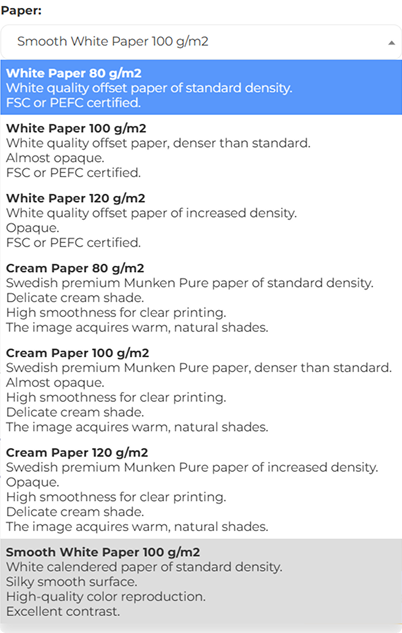
Now that you have chosen the print color, let's move on to choosing the paper. Here it is important to pay attention to its density. Density is measured in grams per square meter (g/m²). To give you an idea, standard office paper has a density of 80 g/m². The higher this number, the thicker and stronger the paper will be.
Here's what you can choose in the configurator:
- White offset paper 80 g/m² — standard paper for most books. It is quite light, convenient, and widely used for printing texts.
- Munken Pure, cream paper 80 g/m² — this high-quality cream-colored paper is ideal for texts that need to be delicate and pleasing to the eye. On this paper, the text will look softer and the contrast less vivid.
- Munken Pure, cream paper 100 g/m² — a denser option that prevents show-through on the reverse side of the page. However, colors on this paper will be less saturated than on white paper.
- Munken Pure, 120 g/m² cream paper — the ideal choice for magazines with a small number of pages. This paper adds elegance and premium quality to the publication.
- Smooth white paper 100 g/m² — the perfect option for high color rendering and contrast. This paper is very smooth, and printing on it looks very clear and professional.
Blog slider
similar articles