Back
BackISBN, UDC and publishing support: how to officially publish a book
Seo block
To sell your own book in bookstores and online platforms, it is important to properly design the publication, and for this you need not only high-quality text and a ready-made layout, but also the ISBN for the book, UDC, source information, and publishing support.
We have prepared an article explaining the process, how to prepare a PDF file of a book and how the ISBN, UDC, author's mark, bibliographic description, source and output information are placed in the finished edition. We will separately consider the numbering of service pages, mandatory copies and reporting after printing.
For the conditions, general composition and cost of publishing support, see the page "Publishing a book with ISBN". This article supplements the description of the service with technical rules and design examples.
Printto as a printing house and a publishing house: what's the difference?
In a print-only order, Printto is the manufacturer: it receives the prepared PDF file, prints the agreed edition and transfers it to the customer.
If the ISBN is provided from the Printto publishing block, the company acts as the publisher of a specific edition: it records the number, determines the UDC and author's mark, generates initial and final information, establishes the route of legal copies, sends them to recipients and reports on the book's release.
At the same time, the author remains responsible for the content of the book, the reliability of the information provided and the legality of the use of texts, photographs and illustrations.
Before submitting your PDF, also review the layout requirements; for a complete list of PDF settings, fields, formats, and cover requirements, see "How to Prepare a Layout for Print."
What is ISBN, UDC and copyright symbol?
On the back of the title page, the reader sees several short codes. They are formed individually for each edition, perform different functions, and do not replace each other.
- ISBN. International Standard Book Number — an international number for a specific edition or a separate commercial form of a book. It is needed for bibliographic accounting, sales, and the work of bookstores, libraries, and distributors. Another language, a reissued edition, or a different commercial format — for example, separate PDFs and EPUBs, replacing paperbacks with hardbacks, or vice versa — usually requires a separate ISBN.
- UDC. The Universal Decimal Classification describes the subject and field of knowledge to which a book belongs. The index is determined by the content of the publication, and not by the author's surname or the desired sales category, in accordance with the requirements of the National Standards of Ukraine and the Ivan Fedorov Book Chamber of Ukraine.
- Author's symbol. This is a letter and two-digit number that libraries use to arrange books in alphabetical order. The symbol is determined by the author's last name or the first word of the title, depending on the type of publication.
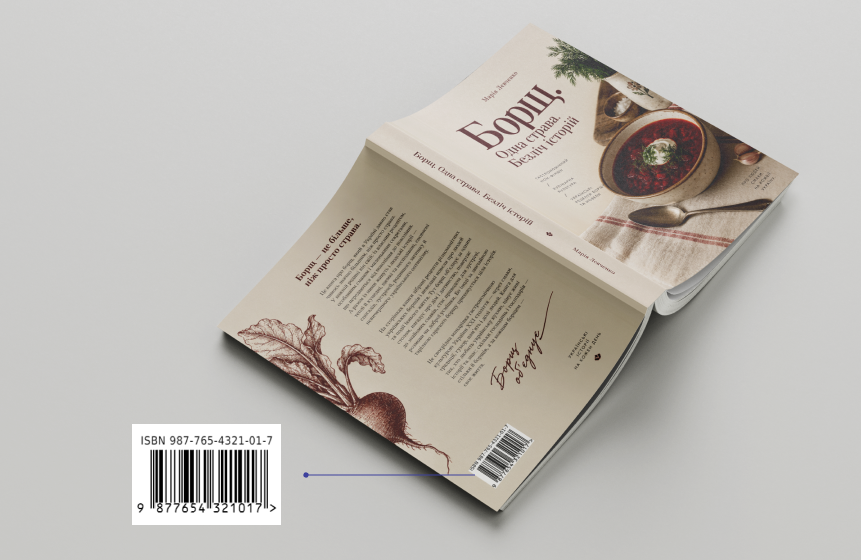
- EAN-13 barcode. The barcode is generated based on the ISBN and is placed on the back of the cover. It allows you to identify the publication in trade and accounting systems.
Important: ISBN does not register copyright or confirm authorship. Rights to text or illustrations arise and are transferred under copyright law, and ISBN only identifies the publication.
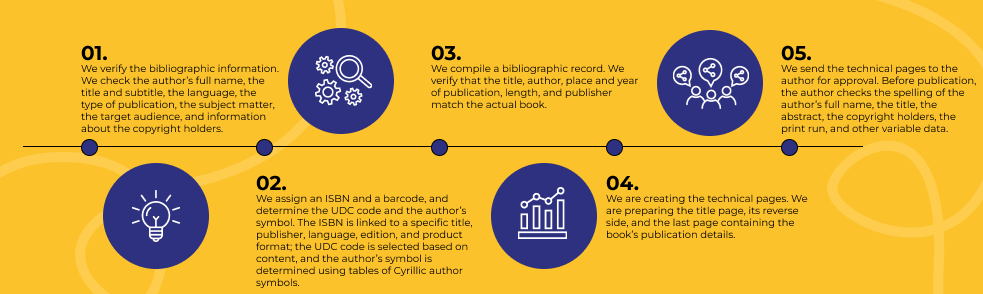
For publishing purposes, you need one multi-page PDF file. The number of pages must be even, including the title page and two service pages/
If the book is not yet typed, you can order layout and design.
Technical pages of the book: what the publication should contain
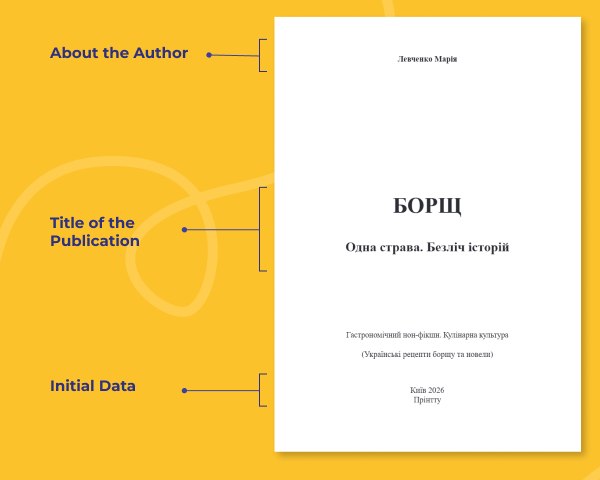
Below are three service pages of the finished edition. Explanations of the symbols are placed directly below each diagram.
- Title page
The first technical page introduces the book and is the main source of information about the publication. The diagram shows:
- information about the author - first and last name of the author or authors in an agreed form;
- title of the publication - the full title of the book and subtitle, if any;
- source data — place of publication, name of publisher, and year of publication.
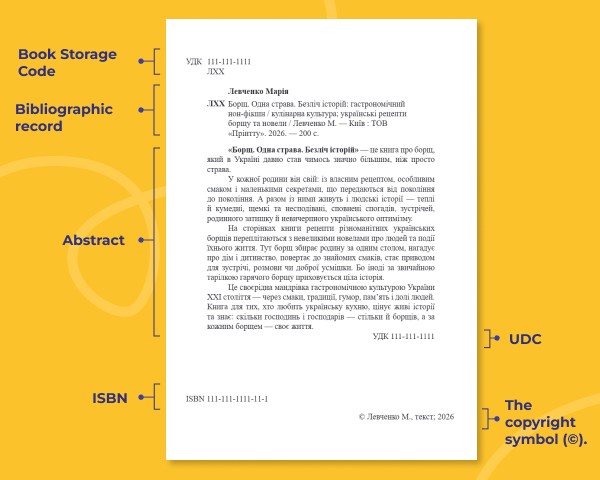
2. Back of the title page
The second technical page is required for bibliographic accounting and correct identification of the book. It contains:
- the book's storage code — UDC and author's mark, by which the library determines the thematic section and the book's place on the shelf;
- bibliographic entry - author, title, type of publication, place of publication, publisher, year and number of pages;
- abstract — a brief description of the contents of a book;
- ISBN — an international standard number assigned to a specific publication;
- UDC is an index that reflects the topic and field of knowledge of the book;
- Copyright symbol © — name of the copyright holder, object of protection, and year of publication.
Regarding BBK: this code is obsolete and is not used in the current design of Printto.
It is this page that helps libraries and information systems correctly describe and classify a book.
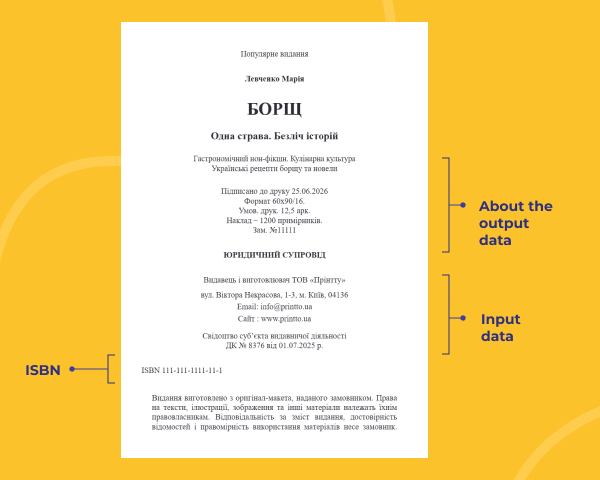
Latest technical page
Diagram of the last technical page.
The last page completes the official design of the publication. The diagram shows:
- extracurricular data — type of publication, author's name, and book title;
- release data - date of signing for printing, format, volume in conventional printed sheets, circulation and order number;
- information about the publisher and manufacturer - name, address, contacts and Certificate of the publishing entity "Printto";
- ISBN — a repetition of the number of a specific publication;
- Legal disclaimer — information about the ownership of rights and the customer's responsibility for the content and legality of the use of materials. In the Printto layout, this block is called "LEGAL SUPPORT".
Mandatory copies: how many do we print and where do we send them?
After the publication of the edition, the publisher must transfer a certain number of mandatory copies to state institutions and libraries of Ukraine. This obligation is related to the fact of publication, and not only to the presence of an ISBN. The order of distribution is determined by:
- Law of Ukraine "On the Mandatory Copy of Documents" No. 595-XIV;
- Law of Ukraine "On Publishing" No. 318/97-VR;
Resolution of the Cabinet of Ministers of Ukraine No. 608 "On the Procedure for Delivering Mandatory Copies of Documents." - For a regular book, the basic route covers seven institutions, but eight physical copies are required: the Vernadsky National Library of Ukraine receives two. Depending on the subject, type, and place of publication of the book, other recipients may be added. For example, separate copies are provided for historical, medical, legal, children's, educational, and other specialized publications.
How it works for the author: Printto determines the route of a specific book to the final print run. The production of legal copies is added to the printing bill, and Printto pays for their delivery to institutions and libraries on its own.
For example, if the author needs 10 personal copies, at least 8 basic copies are added to them - therefore, the starting print run will be 18. If the subject or territory requires additional recipients, the number will be larger.
Legal copies are sent on the day the first part of the print run is published. The author does not need to prepare mailing lists or organize shipping on his own.
Blog slider
similar articles